Static AI-agent security for CI/CD

Your CI has an AI agent.
A stranger's issue can drive it.

You wired an AI agent into GitHub Actions to triage issues and review pull requests. It runs on text anyone can write, and it holds real secrets. agentpipe finds that chain before an attacker does.

$pip install agentpipe-scan copy
Open source, MIT Static and read-only No exploit ever run
agentpipe scan
$ agentpipe scan . scanning .github/workflows … 3 files ✗ AWI-01 reachable · high untrusted trigger runs an agent with a secret sink .github/workflows/triage.yml:11 ✗ AWI-02 reachable · high untrusted issue title interpolated into the prompt .github/workflows/triage.yml:18 ✗ AWI-05 plausible · high agent runs with --dangerously-skip-permissions .github/workflows/triage.yml:24 4 findings · 4 high · 1 file fix: agentpipe fix . prove: agentpipe prove AWI-01
claude-code-actionCopilot workflowsagentic PR botsGitHub Actionsany AI agent step
The problem

One opened issue, and your pipeline publishes for a stranger

A workflow triggers on an issue or a pull request. It drops the issue title straight into the agent's prompt. The job holds an npm token and publish rights. Now anyone who opens an issue is handing instructions to a process that can publish your package or leak your keys. No one clicked anything. We call this class clinejection, and it is landing in real repos.

untrusted issue→ AI agent step→ npm token→ publish
See it

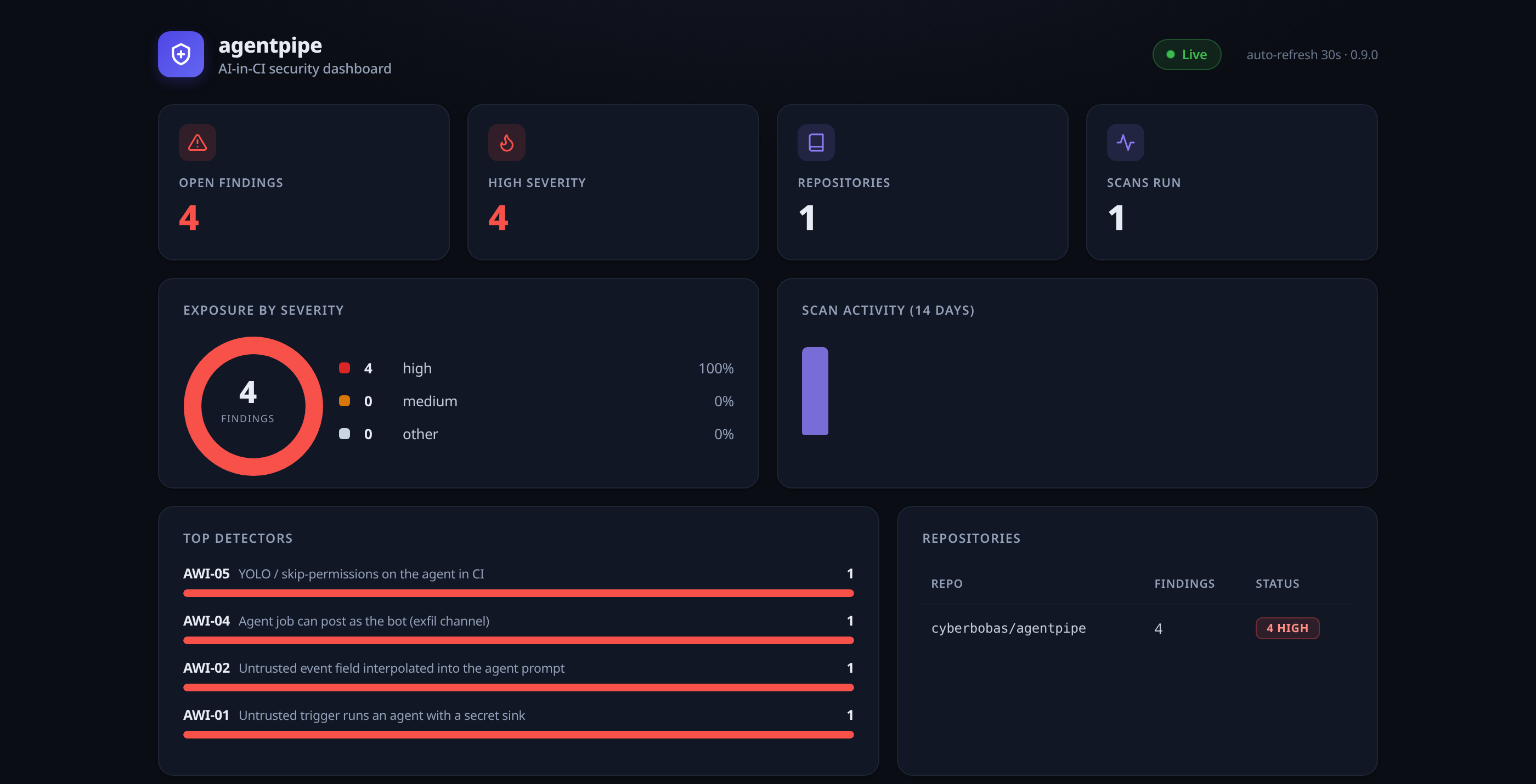
Every exposed chain, across every repo, on one dashboard

The hosted App scans each pull request in real time and records the findings. You get the detector, the verdict, the exact file and line, and the trend over time.
agentpipe.agentoffense.com/dashboard
agentpipe dashboard: open findings, exposure by severity, top detectors and repositories

Real dashboard from the live App. Static analysis only, no exploit is ever run.
findings & what to do
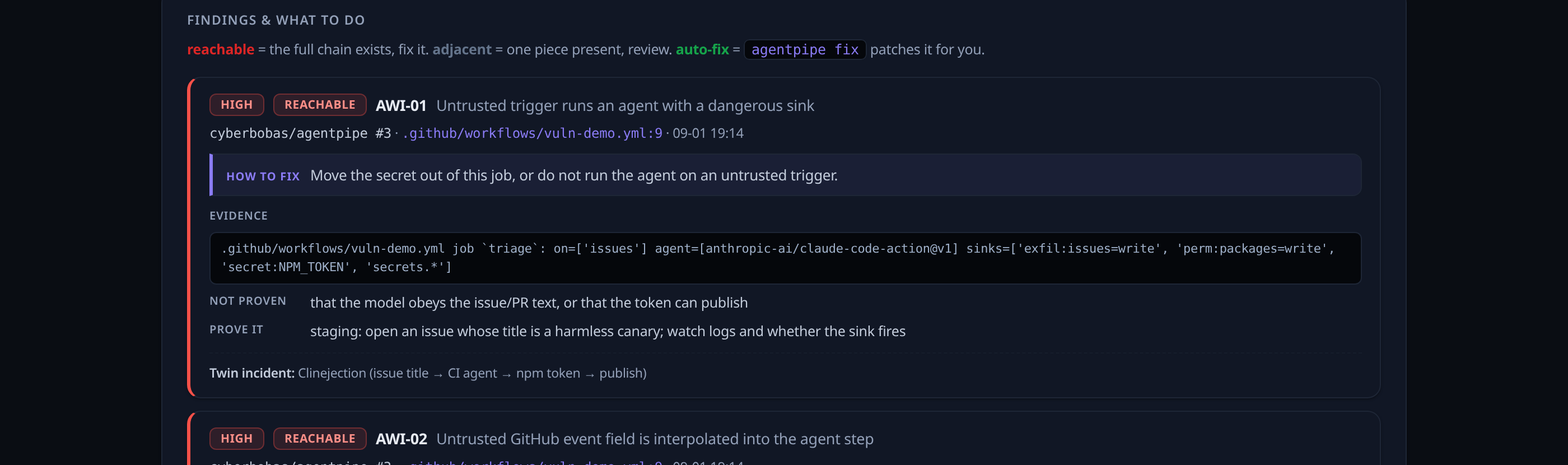
a single agentpipe finding with verdict, how to fix, evidence and the twin incident

Every finding carries the verdict, the exact file and line, the one change that fixes it, and the real incident it maps to.

Use it

Three ways to run the same engine

From a one-off check on your laptop to a service that watches your whole organization. One engine, your choice of how much to automate.

Free, OSS

1. In your terminal

Run a command, read the findings. Nothing to install on a server. Great for a one-off check or trying it out.

pip install agentpipe-scan agentpipe scan . # this repo agentpipe local # local agent config
Free, OSS

2. In your CI

Add one workflow file. On every pull request a bot posts one sticky comment and uploads results to your Security tab (SARIF).

# .github/workflows/agentpipe.yml uses: cyberbobas/agentpipe@v0 with: fail-on: high comment: true
CLI vs the hosted App

What the hosted App does that running the CLI cannot

The CLI is a flashlight you point yourself. The hosted App is a smoke detector wired through the whole building. Same engine, very different coverage.

CLI (free)Action (free)Hosted App
When it runswhen you type a commandon each PR, per repoon every PR, whole org, automatically
Setupnone, but manual every timea workflow file in every repoone click on the org
Coverageone repo, one runone repoevery repo, current and future
Who sees resultsonly you, in your terminalon the pull requestthe PR and a shared dashboard
History and trendnonenonefull history and trend over time
Org policy a repo cannot weakennoper repo, editable by anyoneyes
Maintenanceyou run ityou keep the workflow updatednone, managed by us

Short version: the CLI answers "is this repo exposed right now, if I check." The App answers "is anything across our whole org exposed, ever," without anyone lifting a finger.

How the hosted App works

You install once. It runs itself.

Install on your org

Pick the repos, or all of them including future ones. One click, no config files.

A pull request opens

Someone opens or updates a PR in any covered repo. GitHub notifies our server over a signed, verified webhook.

We read the workflows

A short-lived token reads only the workflow files at that exact version of the PR. We never touch your source or secrets.

The engine runs

The same static engine traces every untrusted-trigger to agent to sink chain the PR introduces.

One clear comment

A single sticky comment lands on the PR with the chains and the one change that fixes each. Signal, not noise.

It shows on the dashboard

Coverage, what is exposed across repos, and the trend over time. The evidence you show an auditor.

Why agentpipe

Not a linter. Not a guardrail.

Linters check workflow config. Code scanners check code. Guardrails check the prompt going into the model. No tool traces the untrusted-event to agent to secret chain statically in CI. That is our lane.

Not a linter or code scanner

zizmor and CodeQL flag misconfig and injection in code. We trace the actual link: an untrusted event reaching an AI-agent step that then reaches a secret, write, or publish sink.

Not a guardrail

Guardrails inspect the prompt going into the model. We watch the action the model's step takes in CI. A clean prompt passes a guardrail, then the agent reads a token and publishes. We catch that.

Honest by design

Every finding says what it proves, what it does not, and the one change that fixes it. agentpipe prove confirms it with a harmless canary, never an exploit.

Free beta

Free while in beta, with fair-use limits

The CLI and the Action are unlimited and open source, forever. The hosted App is free during beta with generous fair-use limits so it stays fast for everyone: PR scans, the dashboard, and org-wide coverage included. Need enterprise policy enforcement or higher volume? Contact us for early access.

What it does not do (on purpose)

agentpipe reports preconditions, not proof of exploitation. It analyzes GitHub Actions and local agent configs, statically. It does not run your agent and it does not stop prompt injection. Every report ends with what the scan cannot see, which is exactly where a real pentest begins.

Questions

Frequently asked

Do you run or store my code?
No. It is static analysis. The hosted App reads only workflow files at the PR version and stores findings (detector, file, and line), never your source or your secrets.
Is it really free?
The CLI and the Action are free and open source forever (MIT). The hosted App is free during beta with generous fair-use limits.
Does it work with Copilot, Claude, and other agents?
Yes. It detects the pattern (untrusted trigger to agent step to sink) regardless of which agent you use.
Will it spam my pull requests?
No. One sticky comment, reachable-high only by default, and silent on your existing debt (baseline mode). Noise is uninstall, so quiet is the default.
Can I self-host?
The engine is open source (MIT), so you can already run it yourself in your own CI, no server of ours involved. A managed, self-hosted deployment for enterprise is on the roadmap. If you need it, talk to us.

Find the chain before an attacker does

Run it yourself with the free CLI, or install the App once and let it watch every repo, on every pull request, with a dashboard for your whole team.

$pip install agentpipe-scan copy